





Welcome to Your termios Pro

Your Heating.
Your Data.
Your Choice.
What we’ve improved
We listen to your feedback and are continuously improving termios Pro. Here’s a look at what’s already changed.
Response time for reported issues reduced to a maximum of 5 working days
New privacy overview: clear explanation of which data is collected – and which isn’t
No more AI: human customer service now available at +49 211 86089065
Software update: new display in sommer mode
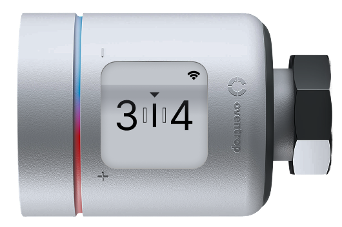


Using termios Pro: What to expect
termios Pro works differently from your old thermostats
With your analogue thermostats you only had settings 1 through 5. Many people simply knew: “Level 3 feels comfortable for me.”
With termios Pro you still set a level using the dial – from the snowflake (frost protection) up to level 5. The thermostat then measures the temperature in the room and automatically controls the heat.

Good to know: Radiators can be warm to different degrees. What matters is not how hot the radiator feels, but how the air in the room feels. Leave a level set for 1–2 hours before turning it up further.

Tip: If it feels too cold, turn the level up a little and give the system some time to settle.
My heating isn’t heating properly – what can I do?
Sometimes the radiator feels cool even though a higher level is set. This can be normal. It usually means the desired room temperature has already been reached and the thermostat is letting less hot water into the radiator.

Tip: First check the set level. Turn it up by one level and wait 1–2 hours. If the room then becomes warmer, the thermostat is working correctly.

If it still feels too cool or the radiator does not heat up at all, please report the problem via report a problem.
How it works
Privacy: What data is collected and what isn’t?
Your data is safe with us. termios Pro only collects information that is necessary to operate the heating system. The data is transmitted in encrypted form, evaluated anonymously and stored in data centres in Europe. Our solution is audited for GDPR compliance.

Which data does termios Pro need?
To ensure that the heating works properly, the system needs some technical data:
- Temperature at the thermostat
- Position of the heating valve
- Whether heat is reaching the radiators
This data helps ensure that all apartments stay sufficiently warm without wasting unnecessary energy. The data is processed anonymously and does not reveal when you are at home.
What your landlord can see
What your landlord CANNOT see

Whether thermostats and gateways are technically reachable
Whether individual devices report a fault
Whether the heating system as a whole is working correctly

No movement profile of your apartment
No information about when you are at home or away
No data about when you sleep, have visitors or are on holiday
No data related to your heating cost billing
No content from your app usage or support requests
Coming Soon:
Comfort insights – only with your consent
termios Pro can help you save even more energy by analyzing additional data – for example, typical heating times in your apartment.
These evaluations ONLY take place if you have given your prior consent. You will then be informed exactly:
- ...which additional data is being used
- ...what the data is used for
- ...how long the data is stored
You can withdraw your consent at any time by emailing datenschutz@termios.de. From that point on, this data will no longer be used. The basic heating functions will always remain active.

How we protect your data

End‑to‑end encryption from the thermostat to the cloud

Storage in data centres in Europe

Regular audits by TÜV Süd

GDPR compliant
Frequently asked questions
Do you have questions about the technology, use cases or general aspects of operating termios Pro? Here you will find the most frequently asked questions and answers.
Operation & function

termios Pro provides hydraulic balancing. This ensures that the heating water is distributed optimally to all radiators in the building. Each room receives exactly the amount of heat it needs, without the risk of over‑ or undersupply.
You’re on a trip, out during the day, or is a window open? Your new thermostat automatically adjusts the room temperature. In addition, automatic night setback provides further energy and cost savings. At the same time, comfort remains a priority: the thermostats learn your preferred temperatures and adapt automatically.
For networking we use the established wireless standard LoRaWAN which – unlike Wi‑Fi, BLE or EnOcean – was developed specifically for connecting many devices in buildings and cities. LoRaWAN offers long range, low energy consumption and a high level of security. With LoRaWAN we can connect hundreds of thermostats using only a few access points – quickly, securely and efficiently.
No. termios Pro works independently of your home Wi‑Fi via LoRaWAN and mobile networks.
No. Thanks to thermo‑harvesting, termios Pro is maintenance‑free for at least 5 years. No battery replacement is required.
In addition to your personal cover letter, you will find an Instructional video on this page that walks you through the first steps and basic operation of the smart thermostat. We have also compiled further helpful information for you:
Simply turn the thermostat: to the right = warmer, to the left = cooler.
Use the snowflake and the numbers 1 to 5 to set your desired room temperature. The higher the number, the warmer the room will be. Once the room has reached the desired temperature, the thermostat keeps it at that level. If the room is already warm enough, the radiator will not continue to heat.
It can take up to 10 minutes for the desired temperature to be reached. For finer control of the room temperature you can also select intermediate steps (e.g. 1.25, 1.50, 1.75).
The device is in frost protection mode (6 °C). This prevents the heating system from freezing when it is very cold. When the heating is set to this mode, it can take up to 30 minutes for the radiator to cool down completely.
The device is in installation mode. Please contact customer service.
The thermostat is in summer mode. Summer mode is activated automatically when the heating is not used for an extended period of time in order to reduce battery consumption. The thermostat exits summer mode either automatically when the radiator becomes warm again, or on request.
Installation & service
Before installation, you may have questions regarding the landlord’s information letter – for example regarding your obligation to tolerate the measure or a potential rent increase. Your landlord will answer these questions for you.
You will receive all information before installation starts via an information letter from your landlord. All further communication then takes place directly via termios.
The decision to install smart thermostats is made by the landlord.
Yes. You can use the QR code in the termios letter to access our appointment tool. There you can easily manage your installation appointment and choose your preferred date.
In this case, the date mentioned in the letter is no longer valid. The appointment booked via SMS applies and can also be viewed via the QR code.
An authorised person with access to all radiators can allow the installation of the smart thermostats on your behalf.
If you are not at home at the agreed time and do not cancel in time (at least 48 hours in advance), this may lead to additional costs. These costs may be passed on to you by the landlord.
Please send a short email to terminbuchung@termios.de. We will send the letter to you again.
Please make sure that an adult is present and that all radiators are easily accessible. During installation, photos of radiators and thermostats are taken for quality assurance.
Installation of the smart thermostats takes around 30 minutes per apartment.
Data & privacy
Your privacy and compliance with the General Data Protection Regulation (GDPR) are our top priority. We have implemented extensive security measures to collect, process and store your data securely: end‑to‑end encryption, pseudonymisation of data, separate data storage and a dedicated mobile APN to increase security. You can find more details in the privacy section on this page.
termios Pro processes certain data to reduce heating costs and increase comfort. All data is processed in line with the GDPR and securely protected. We distinguish between:
- Basic functions (e.g. room temperature control, hydraulic balancing): These are necessary for operation and do not require consent. The landlord only receives anonymised system information.
- Additional functions (e.g. open‑window detection, absence‑based control, night setback): These increase comfort and require your voluntary consent, because personal data needs to be processed. You can give consent for these additional functions online or on site – and you can withdraw it at any time.
Without consent, the thermostat runs in basic mode, so you can continue heating as usual. Additional functions are gradually made available via firmware updates, provided your consent has been given.
Yes. Simply scan the QR code on the letter and select “English” as the language. You can also choose from several languages in the termios app.
Auszeichnung

Gefördert durch das

Forschungsprojekte

termios ist ein Technologieunternehmen, das sich zum Ziel gesetzt hat, Pionierarbeit bei der intelligenten und effizienten Energieoptimierung von Wohngebäuden zu leisten. Unser intelligentes Thermostat unterstützt Immobilieneigentümer bei der Reduktion des Heizenergieverbrauchs im Gebäudebestand.


